









Rolling Sky
Diving into the raw adrenaline of high-speed path traversal takes zero system overhead in 2026. You can experience Rolling Sky directly via modern HTML5 browser modules for an instant web-based match, deploy standalone uncompressed clients on desktop setups, or pilot courses across mobile viewports.
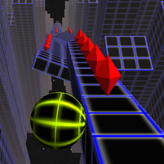
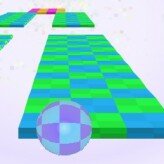
This fast-paced, rhythm-based arcade experience guides a sphere down a shifting, trap-filled path floating high in the clouds — success demands dragging your input device laterally to dodge moving barricades, maintaining balance on micro-width floor tiles, and using the underlying background beats to predict upcoming environmental transformations before they visually appear. Laser gate cycles fire on a strict 0.25-second loop.
🖥️ Where to Play Rolling Sky Today
Global preservation networks offer smooth connection routes without heavy file setups:
🌐 HTML5 Cloud Emulation Portals (WebAssembly)
The core Rolling Sky title operates beautifully within WebAssembly-powered browser frameworks — run instantly inside any standard web browser page without installation delays or hardware configuration blocks.
💻 Desktop Storefront Clients (Microsoft Store / Steam)
For purists who demand zero input latency during intense high-speed runs, uncompressed local configurations are available via the Microsoft Store or as a premium client on Steam — the recommended platform for competitive record attempts.
📱 Native Portable Apps (App Store / Google Play)
Handheld gamers can deploy touch-optimized installations from the Apple App Store or locate active community platforms on the Google Play Store for native gesture input on mobile screens.
Browser (HTML5)
Microsoft Store
Steam
iOS (App Store)
Android (Google Play)
Three Course Theme Profiles
🌌
120
🔵 Cosmic Galaxy
Cosmic Galaxy Arena
Laser Beams & Portals
High grid integrity — the most approachable BPM profile. Laser gates cycle on a strict 0.25-second loop. Learn to read gate timing by ear before attempting higher BPM stages.
🌆
140
🟡 Neon City
Neon City Grid
Side-Shifting Blocks
Rapid fall cascades — floor blocks drop and shift on half-beat intervals. Short, rapid micro-movements replace wide sweeps. Outer edge lanes often remain hazard-free when center rows fill with pop-up walls.
⛈️
160
🔴 Stormy Sky
Stormy Sky Run
Swinging Iron Hammers
Critical micro-tiles — the highest-intensity profile. Swinging hammers activate on every downbeat. Palm-anchor micro-strafing is mandatory to survive single-tile pathways at this speed.
Core Mechanics & Key Numbers
⚙️ Three Technical Pillars
-
☝️ One-Touch Spatial Tracking Script
The system translates finger flick or mouse drag distances into precise sideways velocities — no digital button taps. Advanced players can slide through micro-gaps with millimeter accuracy using fingertip-only movements anchored by a palm rest.
-
🎵 Rhythm-Synced Terrain Destruction
Floor blocks drop into the abyss, shift side-to-side on specific tempos, and trigger pop-up hazards — all synchronized to background beats. The musical track is an active roadmap for incoming spatial hazards, not background decoration.
-
🎨 Dynamic Audio-Visual Theme Profiles
Levels switch rendering pipelines instantly between neon city, cosmic galaxy, jungle canopy, and storm patterns — altering color schemes of danger indicators to test your visual adaptation to a new hazard language each stage.
📊 Rolling Sky — Key Numbers
| Parameter |
Value |
| ⚡ Laser Gate Cycle Window |
0.25 seconds |
| 🎵 BPM Range (Easy → Hard) |
120 → 160 BPM |
| 🖱️ Recommended Mouse DPI |
800 DPI |
| ⏱️ Input Window (Hazard Dodge) |
5 frames |
| 🖥️ V-Sync Requirement |
Required at 144Hz+ |
| 🎮 Platform |
HTML5 / Mobile / PC |
Then vs. Now
📼 Early 2D Rolling Clones
Basic 2D rolling platforms with repetitive square shapes, sluggish arrow-key inputs, flat stock audio loops, and zero environmental changes. Casual runners lacked real-time kinetic weight or synchronized musical charts — the music was decoration, not a hazard predictor.
🎯 Today — Rhythm-Synced 3D Runner
Immersive 3D track generation arrays, highly responsive real-time drag-and-flick control loops, fully produced musical scores, and smooth canvas execution running flawlessly inside an open internet browser. Every obstacle pop-up is placed on a downbeat — the music is the map.
Expert Tactics — Audio Pre-Buffering & Micro-Strafing
🎵 Snare-Pattern Pre-Buffering
-
👂 Listen — Don’t Watch — for Obstacles
The level design team placed every major obstacle pop-up on the dominant downbeats. If the background melody drops a sudden double-bass beat, the path ahead will immediately sprout a dual-lane obstacle block or force a sharp double-lane change — before the graphics engine renders it.
-
⏱️ Pre-Buffer Hand Gesture Ahead of Visual
Do not wait to physically see the trap rise from the fog. Use your ears to slide your sphere to the safe lane a split-second before the hazard appears. Audio pre-buffering is the primary skill separating five-star players from four-star players.
-
⚡ Laser Gate — Track the 0.25-Second Cycle
Neon City laser trap gates cycle between active and clear on a strict 0.25-second loop. Track the rhythm closely by ear rather than by visual reaction — attempting to pass by sight alone is consistently too slow at 140 BPM.
🎯 Precision Micro-Strafing Technique
-
✋ Palm-Anchor to Restrict Hand Range
On narrow single-tile pathways, rest the base of your palm firmly on your desk or screen frame to physically restrict your hand’s range of motion. Wide panicky sweeps instantly send the sphere off the edge. Only your fingertips should be moving.
-
🔲 Use Outer Edge Lanes as Safe Highways
When center rows fill with massive pop-up wall clusters, look for hazard-free side lanes along the absolute track edge. Riding these thin boundary lines lets you safely roll past complex obstacle clusters without needing to react to each individual block.
-
🚀 Verify Landing Before Jump Pads
When rolling over a launch pad block, you lose all lateral steering control in mid-air. Verify that the landing path is completely clear of moving traps before hitting the pad — you cannot course-correct after launch.
Technical Setup
⚙️ Display & Input Configuration for Rolling Sky
🖥️ V-Sync Required at 144Hz+ Monitors
The sphere’s rolling speed scales directly with monitor refresh frequency. Running on a non-synchronized 144Hz display without enabling vertical sync causes severe stuttering — force an explicit frame-rate cap in your display configuration panel to lock to 60fps or enable V-Sync.
💾 Cookie Cache — No Browser Cleaning Post-Session
Browser-bound preservation uses temporary local cookies to track unlocked maps, custom sphere cosmetics, and high-score achievements. Avoid running automated browser cleaning scripts right after a long run to protect your Rolling Sky profile data.
🖱️ Mouse DPI — 800 DPI Stable Profile
Drop hardware DPI to a stable 800 profile inside your peripheral settings. Higher DPI causes minor hand vibrations to send the sphere flying off narrow edges — the reduced sensitivity forces the physical precision discipline that micro-strafing requires.
🎵 Audio Cue Priority: Every major obstacle in Rolling Sky is placed on a dominant downbeat. The snare drum pattern is the most reliable predictor of incoming dual-lane barriers and lane-change requirements. Pre-buffer your hand gesture before the visual hazard renders — if you’re reacting to what you see, you are already 1–2 frames late at 140–160 BPM.
⚠️ Input Latency Warning: Avoiding falling blocks and swinging hammers requires path adjustment commands within five-frame windows. Any rendering stutter causes an accidental fall. Enable Hardware Acceleration at its highest active profile in your browser’s advanced settings hub and close background streaming tabs to maintain a locked, unhindered rendering speed throughout Rolling Sky sessions.
Summary of Tactics
1
Listen for the double-bass downbeat and pre-buffer your lane shift before the hazard visually appears — audio cues fire 1–2 frames earlier than the render at 140–160 BPM.
2
Palm-anchor your hand on the desk before entering single-tile narrow sections — fingertip-only micro-movements are the only way to stay aligned without sliding off the edge.
3
Track laser gate cycles by the 0.25-second rhythm — attempting visual reaction alone is too slow; the beat marks the safe passage window consistently.
4
Hug the outer edge lanes when center rows fill with pop-up walls — thin boundary lines are typically hazard-free and let you roll past complex obstacle clusters safely.
5
Verify landing zones before jump pads — all lateral steering locks during flight, and you cannot course-correct after launching off a pad.
6
Set mouse DPI to 800 and force V-Sync at 144Hz+ — high DPI amplifies nervous hand tremors into edge falls, and uncapped refresh rates cause sphere speed desync.
The clever, highly addictive design of this rhythm milestone continues to earn high ratings from arcade purists and competitive speedrunners worldwide. By packing distinctive track deformation mechanics, highly responsive gesture controls, and a beautifully synchronized audio-visual framework into a lightweight format, Rolling Sky delivers an exceptional casual experience that proves focused, skill-based design can turn any quick gaming break into a thrilling test of raw spatial awareness and physical precision. The beats are blasting, the skyway is live — slide your way to a historic high score.