



Draw 2 Save Stickman Rescue Shield the Defenseless Hero

51
draw 2 save stickman rescue shield the defenseless hero game
Play Game

Game Information

draw 2 save stickman rescue shield the defenseless hero game
Draw 2 Save Stickman Rescue

Executing instantaneous architectural defense systems is completely accessible on your digital screens in 2026. You can jump directly into Draw 2 Save Stickman Rescue through community-driven web platforms for an immediate browser session, deploy smooth vector drawing files via standalone mobile apps, or test defensive barriers on lightweight portable layouts.

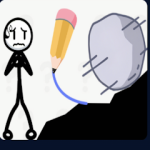
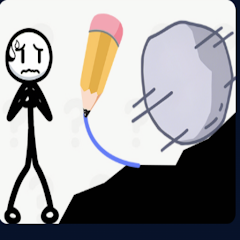
This prominent physics-based brain-teaser strips away traditional action combat loops to focus entirely on structural logic — tasking players with evaluating dangerous free-fall trajectories, avoiding direct character collision frames, and crafting sturdy single-stroke barriers to keep a fragile hero safe from bombs, sharks, swords, and falling rocks.

🖥️ Where to Play Draw 2 Save Stickman Rescue Today

The global digital ecosystem offers clear access paths without intrusive tracking software or corrupt downloads:

🌐 HTML5 Web Simulators
The vector-drawing loop is highly optimized to run inside a browser container — play Draw 2 Save Stickman Rescue directly inside standard web browser tabs without sacrificing local storage space.
🤖 Google Play Store (Android)
Free official mobile application package leveraging native capacitive touch screens for highly accurate finger-drawn barrier creation — the most natural input method for the drawing mechanic.
🍎 Apple App Store (iOS / iPad)
Download across iPhone and iPad interfaces with smooth processing loops for instantaneous line translation and precise gesture recognition.
Browser (HTML5) Android (Google Play) iOS (App Store) iPad
Core Mechanics — The Single-Stroke Engine
✏️ Three Mechanical Gating Parameters
  • ✍️ Single Continuous Stroke Rule Every protective installation must be completed within a single, unbroken drag action. The millisecond you release your click or lift your finger, the drawing cycle closes permanently and the level’s environmental traps spring into active motion.
  • 🚫 Character Collision Exclusion Zone Your lines are strictly forbidden from crossing through the avatar’s character frame. Touching the central asset with your drawing vector registers as an immediate self-inflicted injury — instant round failure.
  • ⏱️ Structural Countdown Retention Building a shield that deflects an initial blast is only half the battle. Your constructed barrier must withstand the resulting physical forces — rolling debris, explosive momentum — and keep the hero unharmed until the countdown clock runs out.
  • 🖋️ Ink Volume Penalty The engine calculates total ink volume used during a stroke. Filling too much screen real estate reduces your end-of-level star ranking — clean, efficient geometry is rewarded over chaotic mass coverage.
🏗️ Barrier Strategy Types
Strategy Type Physics Interaction
📏 Flat Horizontal Wall Prone to tipping and sliding under direct load — weakest option against heavy hazards
🪝 Hooked Anchor Wrap Locks around static environment nodes — the most structurally stable Draw 2 Save barrier
🔺 Wedge Deflection Arc Re-routes kinetic energy downward and sideways — ideal for angled or explosive hazards

True mastery demands utilizing the solid environment blocks already built into the map — hook your lines around stationary pegs to lock shields in place rather than floating them freely over the hero.

Then vs. Now
📼 Early Physics Games — What came before
Primitive MS-Paint style canvas windows with static, unreactive pixel art lines that possessed zero weight, velocity, or real-time physics properties. Players selected pre-built blocks from inventory menus, positioned static ramps, or cut ropes — no freehand drawing, no live structural simulation.
🎯 Today — Live Vector Physics
Dynamic, physics-driven logic arenas where user-drawn vector paths instantly calculate mass, friction, and center of gravity to interact seamlessly with falling boulders, sweeping explosions, and ravenous predators. Draw 2 Save Stickman Rescue places the entire structural engineering decision in the player’s hand — one stroke at a time.
Expert Tactics — Anchoring & Force Deflection
🪝 Anchor-Based Shield Construction
  • 🚫 Never Draw a Flat Roof First Raw kinetic energy from a vertical drop will easily crush an unanchored horizontal line, pinning the barrier down onto the character and triggering a failure state. Flat roofs need anchor support to survive any serious load.
  • 🪝 Start at a Static Block Scan the layout for solid ground fixtures or ceiling hooks. Begin your stroke by wrapping completely around one of these static blocks to create a secure anchor point, then extend outward to form your canopy before hooking onto a second fixture on the opposite side.
  • 🏛️ Use the Ground as a Base Plate If there are no anchoring pegs on screen, draw a heavy base plate that rests flat against the floor. This keeps your shield from sliding out of position under lateral load forces.
🔺 Kinetic Deflection Strategies
  • 📐 Angled Wedge for Vertical Drops When a hazard falls directly from above, draw an angled wedge or a smooth curved arc above the character to re-route downward velocity — guiding falling spikes or rolling logs harmlessly off the sides of the screen.
  • 📦 Think in 3D — Draw Boxes and Umbrellas Treat your lines like solid plastic tubes. A deep box or a protective umbrella shape is always more reliable than a simple flat wall — enclosed geometry distributes load across multiple contact points.
  • 🌀 Scribble Ball as Last Resort If a neat line keeps getting knocked down by heavy debris, deploy a massive springy scribble ball to absorb and bounce away incoming threats. Sometimes organized chaos outperforms elegant geometry.
Technical Setup
⚙️ Browser & Input Configuration
🖥️ Cursor Lock — Full-Screen Mode
Drawing long, sweeping lines can occasionally cause your cursor to slip outside the active game window. Enable full-screen mode or toggle browser pointer-lock overrides to prevent accidental window clicks mid-stroke.
🖊️ Anti-Aliasing — WebGL Smooth Lines
Low-spec rendering profiles can cause user-drawn lines to appear jagged, creating micro-gaps in structural collision frames. Ensure your browser’s WebGL settings are updated to render smooth vector lines.
🖱️ Mouse Polling Rate — 500Hz
Set your gaming mouse polling rate to a stable 500Hz baseline. This prevents the browser script from getting overwhelmed by too many coordinate updates, keeping drawn lines completely smooth and unbroken.
⚠️ Input Lag Warning: A single stray pixel or erratic wobble can leave an opening in your defensive barrier — input lag in Draw 2 Save Stickman Rescue causes otherwise perfect shields to fail. Enable Hardware Acceleration in your browser configuration and close heavy background applications to maintain a flawless 60 FPS processing speed during stroke execution.
⭐ Star Ranking System: The engine calculates your total ink volume per stroke. Filling too much screen area reduces your end-of-level star score — clean, efficient geometry earns higher rankings than chaotic mass coverage. Plan your line before drawing it.
Summary of Tactics
1
Never draw a flat roof without anchor support — unanchored horizontal lines collapse instantly under vertical kinetic load.
2
Start every stroke by wrapping around a static environment block to create a secure anchor point before extending outward.
3
Use angled wedges or curved arcs for vertical hazards — deflecting force sideways is more effective than absorbing it head-on.
4
Draw enclosed box or umbrella shapes rather than flat lines — distributed load geometry always outperforms single-plane barriers.
5
Use a ground base plate when no anchor pegs are available — floor contact prevents lateral sliding under impact.
6
Enable Hardware Acceleration and set mouse polling to 500Hz — even a minor frame drop causes mid-stroke wobbles that open fatal gaps in your barrier.
The elegant, open-ended design of this drawing puzzle continues to challenge millions of minds worldwide. By packing rewarding physics modeling, spatial layout planning, and creative freedom into a lightweight browser window, Draw 2 Save Stickman Rescue delivers a phenomenal mental workout that proves there is never just one correct way to solve a problem. Your ink reservoir is filled, the countdown is primed — visualize your geometric path and engineer the ultimate single-stroke defensive masterpiece.

Play Draw 2 Save Stickman Rescue game online in your browser free of charge on Arcade Spot. This game is a classic holiday-themed platform game that works in all major modern web browsers. This online game is part of the Action, Platform, Emulator, and SNES gaming categories. Draw 2 Save Stickman Rescue has festive levels, colorful graphics, and fun retro gameplay for fans of old-school adventures. If you enjoy this game then also play other racing games on our website. Arcade Spot brings you the best games without downloading and a fun gaming experience on your computers, mobile phones, and tablets. New arcade games and the most popular free online games are added every day to the site.