




Dop Fun Delete One Part Reveal the Hidden Layer

52
dop fun delete one part reveal the hidden layer game
Play Game

Game Information

dop fun delete one part reveal the hidden layer game
Dop Fun Delete One Part

Diving into a dynamic multi-layered illustration challenge is instantly accessible across your digital devices in 2026. You can experience Dop Fun Delete One Part through community-driven web platforms for an immediate browser session, deploy smooth interactive controls via standalone mobile software installations, or study layer hierarchies on optimized local layouts.

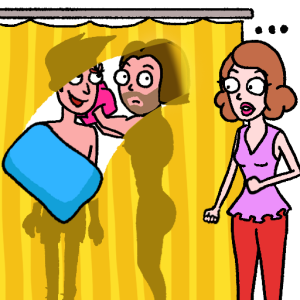
This prominent brain-teaser release shakes up standard item-collection puzzle setups by building its entire progression loop around a subtraction mechanic — tasking players with evaluating confusing situations, identifying odd anomalies, and drawing vector eraser paths to clear away masking elements and reveal the hidden solution layer beneath.

🖥️ Where to Play Dop Fun Delete One Part Today

The software ecosystem provides clear access paths with zero paywalls:

🌐 HTML5 Web Portals
The core Dop Fun Delete One Part logic runs smoothly inside an optimized browser container — play directly inside a standard modern web browser window with zero local storage penalties.
🤖 Google Play Store (Android)
Free mobile installation package utilizing native mobile swipe gestures for direct, touch-based control — the most natural input method for the erasing mechanic.
🍎 Apple App Store (iOS / iPad / Mac)
Download across iPhone, iPad, and Mac environments with cloud account progress syncing for continuous game puzzle sessions across devices.
Browser (HTML5) Android (Google Play) iOS (App Store) iPad Mac
Core Mechanics
🖊️ How the Erasure Engine Works
  • 🖼️ The Layer Reveal Loop The illustration space uses a two-tier drawing canvas. The upper layer shows a confusing or misleading situation, while the underlying background contains the true answer or a funny plot twist waiting to be exposed.
  • 🎯 Vector Boundary Tracking Passing your cursor over random parts of the screen does not cause blind damage. The engine uses invisible boundary zones concealed inside the illustration file — a success state only triggers when your swipe crosses a specific percentage threshold of that designated zone.
  • 🧠 Rhythmic Deduction — No Timer Every line, shadow, and odd character expression provides a potential clue. The gameplay focuses entirely on visual analysis — pause, evaluate the scene, and deduce exactly which element needs to be removed.
  • 📏 Minimum Swipe Distance The vector tracking script ignores accidental taps or jittery brief swipes. To activate the erasing loop, your movement must travel in a continuous line for at least 15 pixels across the target area.
🚧 Screen Layer Elements
Layer Element Function
🎭 Masking Foreground Displays the initial visual trap — deliberately flashy to misdirect attention
🎯 Target Boundary Box Registers swipe vector inputs — invisible until your eraser crosses its threshold
✅ Revealed Solution Unloads the level and triggers progress when the boundary percentage is cleared

The foreground layer is deliberately designed to trick your eyes with prominent, flashy objects. The actual solution is tucked beneath a seemingly minor part of the background — turning every Dop Fun Delete One Part stage into a true test of out-of-the-box thinking.

Then vs. Now
📼 Early Brain Games — What came before
Static, flat image files with zero physics interactions where players blindly clicked on blurry pixels to find small hotspots. Addition mechanics dominated — tap to collect, drag a missing piece, paint an incomplete sketch. Subtraction was never the core loop.
🎯 Today — Dynamic Vector Erasure
Fully dynamic multi-layered vector arenas where using your finger like a digital eraser smoothly uncovers secondary background details with immediate, clean processing feedback. Dop Fun Delete One Part inverts the entire genre’s expectation — remove rather than add.
Expert Tactics — Visual Traps & Hint Management
🔍 Reading the Scene
  • 🚫 Ignore the Largest Object First The illustrators intentionally place massive, bright red herrings in the foreground to burn up your attempts. Do not immediately wipe your cursor across the most suspicious-looking object on screen.
  • 👁️ Scan the Full Image Border Look for small inconsistencies — an unusual shadow, a misaligned clothing seam, or an item that looks slightly out of place compared to the room’s art style. These peripheral anomalies are almost always the real target zone.
  • 🔎 Look for Hidden Seams Scan the outer edges of large objects before erasing them. A slight break in the artwork lines almost always points directly to an underlying layer boundary that the illustrator left as a subtle clue.
  • 😂 Think Like a Comedian Many of the trickiest Dop Fun Delete One Part puzzles rely on funny cartoon logic. If a direct approach fails, try erasing something absurd — the humor of the underlying layer often follows an unexpected comedic angle.
💡 Hint & Input Strategy
  • 💡 Save Hints for Abstract Multi-Character Scenes Hints are a limited resource — the integrated hint button reveals the exact location of the target boundary box. Hold them for complex scenes where the solution requires abstract logic rather than simple object removal.
  • 📏 Use Long, Smooth Strokes Use long, deliberate strokes when clearing an area rather than fast, erratic taps. The tracking script requires your movement to travel at least 15 pixels in a continuous line — short jittery inputs register as misses.
  • 🖱️ Neutral Mouse Sensitivity Set pointer speed to a steady, neutral pace. High mouse sensitivity causes your cursor to overshoot tight target areas, accidentally erasing adjacent parts of the image and resetting level progress.
Technical Setup
⚙️ Display & Browser Configuration
🎨 Display Calibration — sRGB + High Contrast
High-tier Dop Fun Delete One Part levels place vital clues inside dark background shadows or use very light color differences to mask key items. Set your monitor to a clean sRGB standard and raise contrast to spot faint outlines on the canvas.
🖱️ Pointer Speed — Neutral Baseline
When moving from touch controls to a desktop mouse, set pointer speed to a neutral baseline. High sensitivity causes cursor overshots on tight target areas, accidentally erasing adjacent parts and resetting progress.
🧹 Browser Cache Management
If the erasing animation stutters or drops frames during layer reveals, clear your browser’s temporary internet files to free up processing memory and keep transition animations buttery smooth.
⚠️ Input Lag Warning: Triggering a level clear depends on clearing a specific vector boundary box — any input lag or cursor jumping throws your line off target and registers as a miss. Enable Hardware Acceleration in your browser configuration and temporarily close demanding background tasks to keep frame delivery flawless during Dop Fun Delete One Part puzzle sequences.
Summary of Tactics
1
Never erase the largest or most obvious object first — it’s almost always the red herring placed to burn your initial attempts.
2
Scan the full image border for small inconsistencies — unusual shadows, misaligned seams, or slightly out-of-place items are almost always the real target.
3
Use long, smooth continuous strokes — the tracking script requires at least 15 pixels of continuous movement to register as a valid erase action.
4
Save hint charges for complex multi-character scenes that require abstract logic — don’t waste them on straightforward early-level shapes.
5
Look for slight breaks in artwork lines at the edges of large objects — these seams almost always mark the boundary of an underlying solution layer.
6
If logic fails, try something absurd — many Dop Fun Delete One Part solutions follow unexpected comedic cartoon logic rather than realistic thinking.
The clever design of this subtraction puzzle continues to attract fans of all ages around the globe. By wrapping deep, rewarding logic puzzles inside a clean and funny cartoon interface, Dop Fun Delete One Part delivers a brilliant mental workout that sharpens your analytical skills with every single layer you uncover. Your digital eraser is charged, the boundary boxes are active — calibrate your controls, trust your eyes, and uncover the ultimate solutions.

Play Dop Fun Delete One Part game online in your browser free of charge on Arcade Spot. This game is a classic holiday-themed platform game that works in all major modern web browsers. This online game is part of the Action, Platform, Emulator, and SNES gaming categories. Game has festive levels, colorful graphics, and fun retro gameplay for fans of old-school adventures. If you enjoy this game then also play other puzzle games on our website. Arcade Spot brings you the best games without downloading and a fun gaming experience on your computers, mobile phones, and tablets. New arcade games and the most popular free online games are added every day to the site.