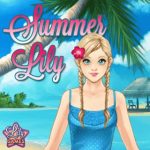
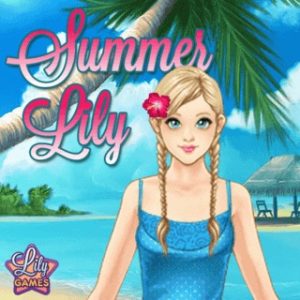






Summer Lily Vacation Dress-Up Combinations

4.0733
summer lily vacation dress-up combinations game
Play Game

Game Information

summer lily vacation dress-up combinations game
Summer Lily

Exploring the pure, therapeutic loops of digital fashion curation requires zero processing overhead in 2026. You can jump directly into the vibrant world of Summer Lily by deploying modernized HTML5 canvas execution wrappers for an instant session, running clean local browser containers on desktop setups, or organizing color layouts across portable mobile viewports.

Published under the Famobi umbrella, Summer Lily puts players in the role of personal travel stylist for a character preparing for a summer vacation across three distinct destinations — beach, gourmet dinner, and wilderness trek. With six inventory layer tabs, an automatic dress-override system, an interactive suitcase packing sequence, and the entire package loading in under 4.5MB with asset swaps completing in under 8 milliseconds.

🖥️ Where to Play Summer Lily Today

Verified web networks offer stable, free access without executable files or background software triggers:

🌐 HTML5 Modernized Browser Frameworks
The complete original release operates flawlessly across modern cross-platform networks — boot Summer Lily directly inside any standard internet window with zero hard drive fragmentation or security issues.
🎮 Famobi Authorized Distribution Network
Access through direct web addresses on major digital gaming platforms hosted under the Famobi umbrella, preserving original high-resolution art assets, smooth button transitions, and multi-language support frameworks.
📱 Responsive Mobile Port Viewports
Opening the game on a smartphone or tablet automatically re-scales the UI panels to match screen dimensions perfectly, switching seamlessly between portrait and landscape modes with full touch-input support.
Browser (HTML5) Famobi Network iOS Mobile Android Mobile Desktop Landscape
Three Vacation Destination Contexts
🏖️
🔵 Beach
Sunny Beach Afternoon
Bright pastels + coral tones
Light separates, bright sunglasses, matching sandals. Use neutral footwear to balance tropical print patterns. Always add the sun hat accessory to complete the coastal aesthetic.
🌟
🟡 Dinner
Gourmet Dinner Under the Stars
Rich jewel tones + metallics
Full-body dress for instant thematic cohesion — the override script clears separates automatically. Refined jewelry accessories in the foreground layer complete the celestial socialite aesthetic.
🌲
🟢 Wilderness
Adventure Wilderness Trek
Earth tones + protective gear
Avoid mixing bright neons with earthy outdoor gear — coordinate a single dominant earth tone. Add the matching camera accessory in the foreground tab to instantly complete the explorer theme.
Six-Tab Wardrobe Layer System
👗 Inventory Layer Priority Table
Category Variants Layer Function
💇 Hairstyles 12 Layer 1 — Base Facial framing — match to neckline; updo for intricate collars
👚 Tops / Bottoms 24 Layer 2 — Mid Color blocking — cleared automatically when a full-body dress is selected
👗 Full-Body Dresses 15 Layer 3 — Override Instant thematic cohesion — activates override script wiping all separates
✨ Accessories 20 Layer 4 — Foreground Destination accents — camera (wilderness), sun hat (beach), jewelry (dinner)
📊 Summer Lily — Key Numbers
Parameter Value
💾 Total Asset Package Size Under 4.5 MB
Dress Model Swap Speed < 8 milliseconds
🎯 Inventory Tabs 6 categories
🌍 Destination Contexts 3 (Beach / Dinner / Wild)
👗 Total Asset Variants 71+ items
🏢 Publisher Famobi
Then vs. Now
📼 Flash-Era Paper Doll Games (2004)
Stiff low-resolution 2D paper-doll drawing scripts with tedious mouse-dragging, broken collision bounding boxes, and regular browser crashes from unoptimized Flash wrappers. Multi-layer sprite sorting was computationally expensive — mixing hairstyles, tops, and accessories simultaneously caused hitching and visual tearing on most systems.
🎯 Today — Famobi HTML5 Canvas
Fluid HTML5 canvas asset sorting, real-time color-palette rendering, instant responsive scaling across mobile and desktop, and completely clean performance running natively inside a browser tab. The entire package transfers under 4.5MB and swaps complex dress models in under 8 milliseconds with zero visual hitching.
Expert Tactics — Three-Color Palette Rule & Quick-Reset Method
🎨 Three-Color Palette Structure
Dominant
Main Top / Dress
Warm pastel or earthy base tone — sets the overall visual register
Secondary
Hairstyle
Complementary shade — frames the face without competing with the outfit
Accent
Accessories Only
Bold striking color reserved exclusively for sunglasses, bags, or jewelry
  • 🚫 Never Mix Bright Neons with Earthy Gear High-contrast clashing items across all tabs create a cluttered visual profile. Bright neon tones against outdoor wilderness gear is the most common styling mistake — it undermines the destination theme entirely.
  • 👟 Neutral Footwear Balances Loud Patterns When experimenting with bright tropical print bottoms or dresses, equip simple white, tan, or metallic shoes. This grounds the outfit and keeps the focal point on the clothing patterns rather than creating a competing visual at the base.
🔄 Quick-Reset & Finishing Techniques
  • 👗 Full-Body Dress = Instant Layer Wipe If your design workspace is cluttered with overlapping separates and mismatched colors, skip manually unequipping each tab. Jump directly to the full-body dress tab and click any one-piece — the layer priority override script wipes all mid-body separates instantly, giving a clean slate.
  • 💇 Match Hairstyle to Neckline If you select a dress or blouse with an intricate collar, choose a short hairstyle or updo asset. Keeping the neck area clear prevents hair textures from clipping over clothing lines — the most common visual artifact in multi-layer styling.
  • ✨ Never Skip the Accessory Tab The foreground accessory layer completes the destination theme — camera for the wilderness trek, sun hat for the beach, refined jewelry for the dinner. Leaving the accessory tab empty is the single most common reason for an incomplete style score.
Technical Setup
⚙️ Display & Input Configuration
🖥️ Expanded Landscape Window
While the canvas natively supports fluid vertical scaling, playing in an expanded landscape window provides the cleanest layout experience. A wider landscape frame spaces out closet rows neatly on the side panel, preventing wardrobe buttons from overlapping Lily’s character model.
💾 Local Cookie — No Cache Clearing Post-Session
Browser-bound casual games use local cookie profiles to remember favorite clothes, high scores, and saved styling progress. Avoid running aggressive automatic cache-cleaning software immediately after playing to keep your profile and wardrobe preferences secure.
🖱️ Cursor Polling — Stable Configuration
Set your pointing device polling rate to a stable configuration to prevent double-click input errors. Every asset tap needs to lock onto Lily’s model accurately on the first try — polling instability causes accidental misclicks on adjacent wardrobe items.
🎨 Three-Color Rule: Dominant (main garment) + Secondary (hairstyle) + Accent (accessories only). Never assign the bold accent color to both a dress pattern and accessories simultaneously — it creates visual competition between the two layers and overwhelms the destination background. The accent color should appear in exactly one location: the foreground accessory slot.
⚠️ Performance Warning: Scrolling through expansive wardrobe sheets and toggling delicate accessories requires cursor clicks within exact millisecond windows. Any display stutter causes accidental misclicks on unwanted assets. Enable Hardware Acceleration at its highest active profile in your browser’s advanced settings panel and close memory-heavy background applications to keep rendering speeds smooth and fluid during Summer Lily sessions.
Summary of Tactics
1
Apply the three-color rule — dominant base (garment), secondary complement (hair), bold accent reserved exclusively for accessories. Never assign bold color to two layers simultaneously.
2
Use the full-body dress tab as a quick-reset — clicking any one-piece wipes all mid-body separates instantly without manually unequipping each tab.
3
Always complete the accessory tab last — camera (wilderness), sun hat (beach), jewelry (dinner). Skipping it is the most common reason for an incomplete destination style score.
4
Match hairstyle to neckline — intricate collars need short cuts or updos to prevent hair texture clipping over clothing lines.
5
Use neutral footwear (white, tan, metallic) with loud pattern bottoms — it grounds the outfit and keeps visual focus on the clothing rather than creating a competing base element.
6
Play in expanded landscape window — wider frame spaces wardrobe tabs cleanly alongside the character model without button overlap on the styling canvas.
The highly charming, therapeutic design of this Famobi milestone continues to hold a beloved space among lifestyle gamers and web preservationists worldwide. By packing distinct location themes, responsive HTML5 touch controls, and a beautifully coordinated visual interface into an open-access format under 4.5MB, Summer Lily demonstrates how focused, high-quality casual design can turn a quick afternoon break into a rewarding test of style and coordination. The suitcases are waiting, the wardrobe is open — curate the ultimate summer lookbook.

Play Summer Lily game online in your browser free of charge on Arcade Spot. This game is a classic holiday-themed platform game that works in all major modern web browsers. This online game is part of the Action, Platform, Emulator, and SNES gaming categories. Summer Lily has festive levels, colorful graphics, and fun retro gameplay for fans of old-school adventures. If you enjoy this game then also play other summer games on our website. Arcade Spot brings you the best games without downloading and a fun gaming experience on your computers, mobile phones, and tablets. New arcade games and the most popular free online games are added every day to the site.