









Rapid Rabbit Rush Web-Based Magnetic Physics and Holiday Logic Mechanics

rapid rabbit rush web-based magnetic physics and holiday logic mechanics game
Play Game

Game Information

rapid rabbit rush web-based magnetic physics and holiday logic mechanics game
Rapid Rabbit Rush

Engaging with web-based reflex simulation requires zero local hardware baggage in 2026. You can explore Rapid Rabbit Rush by launching its HTML5 web player capsule for an instant browser session — no download, no installation, no account required.

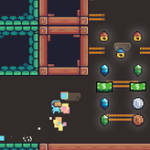
Rapid Rabbit Rush is a browser-based HTML5 casual runner-platformer — a rabbit protagonist sprints through spike-filled environments collecting carrots and reaching the exit portal. The WebGL rendering pipeline processes real-time momentum physics and collision mapping at 60fps. Four core mechanics define the skill ceiling: rhythm sprint, double jump, calculated brake stop, and airborne glide adjustment. A missed double jump or uncalibrated brake can lock the rabbit into a spike hazard corridor, forcing a stage reset.

🖥️ Where to Play Today

Open-access browser deployment — zero installation, instant access:

🌐 Browser — Instant HTML5 WebGL Access
Rapid Rabbit Rush runs directly in any modern browser via HTML5 WebGL at 60fps — keyboard arrows for directional input and spacebar/up for jump. No download, no account, no plugin required. Enable Hardware Acceleration in browser settings for the smoothest momentum physics rendering during high-velocity sprint sequences.
📱 Mobile Browser (Touch Swipe)
Fully playable on iOS Safari and Android Chrome via touch swipe — left/right swipe for directional input, tap for jump. The double jump mechanic translates directly to double-tap. Portrait or landscape orientation supported; landscape provides wider sprint corridor visibility for brake timing.
💾 Browser Cookies — Progress Persistence
Level progress and carrot collection counts are stored in browser cookies. Play in normal (non-incognito) browser mode to retain level unlock status across sessions. Avoid clearing cookies after play — Private/Incognito mode disables cookie persistence and resets all progress at session close.
Browser (HTML5 / WebGL) Desktop Keyboard Mobile Touch (iOS/Android) No Download Required
Four Core Movement Mechanics
🐇
Rhythm Sprint Run
Input: Hold directional key
✅ Outruns collapsing bridge tiles
Multiplies baseline velocity vector — the rabbit builds momentum over time while the key is held. Sustained sprint is required for crossing collapsing platforms and reaching distant carrot clusters. Release timing determines stopping distance for the Brake Stop mechanic.
⬆️⬆️
Double Jump Vector
Input: Jump key twice in mid-air
✅ Crosses wide bottomless gaps
Extends horizontal flight window by pressing jump a second time during the aerial arc. The second jump’s horizontal distance depends on current forward velocity — a fast sprint before the first jump maximizes the double jump’s gap-crossing range. Time the second press at the peak of the first jump arc for maximum height.
🛑
Calculated Brake Stop
Input: Release all directional input
✅ Survives sudden spike barrier drops
Rapid velocity reduction — releasing the directional key decelerates the rabbit over a short distance proportional to current sprint speed. Pre-calculate the stopping distance before entering tight spike corridors. High-speed entry into a confined zone without braking early causes the rabbit to slide into the spike wall.
↩️
Airborne Glide Adjust
Input: Tap opposite direction mid-air
✅ Ducks under low-hanging obstacles
Tapping the opposite directional key while airborne shuts off forward inertia loops — reducing horizontal distance of the current jump arc. Essential for landing on narrow platforms short of a wall, ducking under low-hanging obstacles, and micro-adjusting carrot pickup trajectories mid-flight.
Three Technical Systems & Key Numbers
⚙️ Three Core Technical Systems
60fps
WebGL lightweight rendering pipeline — processes real-time momentum vector math and complex collision mapping at a native 60 frames per second. No input lag on supported browsers with Hardware Acceleration enabled.
  • 🐇 Momentum Vector — Velocity Builds Over Time The rabbit’s forward velocity builds progressively while the directional key is held — not instant. This momentum accumulation means the double jump’s horizontal range grows with sprint duration. For maximum gap coverage, sprint for at least 2–3 steps before jumping rather than jumping from a standing start.
  • 🥕 Carrot Collection + Portal Exit Carrots are collected by contact during normal movement — no separate pickup input required. Stage completion triggers by reaching the designated portal or finish boundary. Carrot collection is optional per level but contributes to high-score totals and unlock thresholds for advanced stage brackets.
  • ⚠️ Spike Hazard Reset — No Mid-Level Checkpoints Contact with spike blocks or falling into trap corridors triggers an immediate stage reset — no mid-level checkpoint exists. The reset wipes the current run configuration. A missed brake stop or mistimed double jump in a late-stage spike section sends the player back to the beginning of that stage.
📊 Rapid Rabbit Rush — Key Numbers
Parameter Value
🖥️ Platform Browser (HTML5 / WebGL)
⚙️ Renderer WebGL — 60fps
⬆️ Double Jump At jump arc peak for max height
🛑 Brake Stop Distance proportional to speed
🖱️ Desktop Input Arrow Keys + Spacebar
💾 Progress Browser Cookies (Normal Mode)
Then vs. Now
📼 Early Browser Era — Flash Limitations
Early browser casual runner games ran on Adobe Flash — rigid single-input designs, local system progress files, and severe rendering slowdowns under heavy sprite asset loads. Flash’s momentum physics approximations introduced input lag that made precise brake stops and double jump timing unreliable. Flash’s December 2020 end-of-life stranded large catalogues of runner titles.
🎯 Today — Native HTML5 WebGL
Rapid Rabbit Rush runs natively on HTML5 WebGL at 60fps — precise real-time momentum vector math with no Flash dependency and no input lag. The active player base scales continuously because zero installation friction makes the game instantly accessible on everything from old desktop hardware to current flagship mobile screens.
Expert Tactics — Sprint Timing & Double Jump Optimization
🐇 Sprint Timing & Brake Stop Calibration
  • 🚫 Never Enter a Spike Corridor at Full Sprint Without Pre-Braking The rabbit’s stopping distance scales with current sprint speed — high-speed entry into a tight spike corridor causes the momentum to carry the rabbit into the wall before deceleration completes. Release the directional key 2–3 steps before the corridor entrance, not at the entrance edge.
  • ⚡ Sprint 2–3 Steps Before Jumping for Maximum Double Jump Range The double jump’s horizontal coverage depends on forward velocity at jump time. Jumping from a standing position produces minimal horizontal range. Sprinting 2–3 steps before the first jump maximizes the velocity vector inherited by the double jump, crossing the widest bottomless gaps on later stages.
  • 🥕 Collect Carrots on the Route — Not as Detours Carrot collection adds to high-score totals but should never require leaving the main run path into spike-adjacent zones. Detour carrot pickups in late stages expose the rabbit to spike contacts that force a full reset — a reset costs more time than the carrot score value gains on the high-score ledger.
⬆️ Double Jump & Airborne Glide Adjustment
  • ⏱️ Press Second Jump at the Peak of the First Arc The second jump’s height output is maximized when pressed at the exact peak of the first jump arc — not during the ascent and not during the descent. Pressing during ascent wastes upward velocity already built; pressing during descent produces minimal additional height. Watch the sprite’s vertical movement direction to identify the peak frame.
  • ↩️ Tap Opposite Direction to Shorten Jump Distance Mid-Air When a jump overshoots a narrow landing platform, tapping the opposite direction mid-flight activates the Airborne Glide Adjust — shutting off forward inertia and reducing horizontal travel distance. This is the precision tool for landing on carrot platforms shorter than the default jump arc covers.
  • ⚠️ No Checkpoint — Reset Prevention Is the Priority No mid-level checkpoint exists — any spike contact or trap fall restarts the entire stage. Reset prevention outweighs carrot collection, speed optimization, and high-score maximization. A safe, slower run that reaches the portal is worth more than a fast run with a reset.
Technical Setup
⚙️ Browser Configuration
🖥️ Widescreen Native — No Forced Stretch
Rapid Rabbit Rush renders at the native widescreen ratio of web application screens. Avoid manually stretching or compressing the browser window — distorted aspect ratios shift the visual spike hazard positions relative to actual collision zones, making brake stop distances visually incorrect.
⚙️ Hardware Acceleration — Enable at Maximum
Enable Hardware Acceleration in browser advanced settings to offload WebGL rendering to the GPU. The momentum physics pipeline calculates vector math in real time — GPU offloading ensures the 60fps pipeline runs without frame drops during high-velocity sprint sequences on complex late-stage layouts.
💾 Normal Browser Mode — Cookie Persistence
Use standard (non-incognito) mode to retain level progress and high-score records. Close non-essential background browser tabs — competing WebGL processes from other tabs introduce brief input lag on jump and brake inputs during critical timing windows.
🛑 Brake Stop — Pre-Calculate Stopping Distance: The brake stop deceleration distance scales directly with current sprint speed — a full-speed rabbit requires significantly more distance to stop than a half-speed rabbit. On late-stage spike corridors where the stopping zone is narrow, players who maintain full sprint into the entry zone consistently overshoot. The correct habit: identify the stopping zone 3–4 steps before it, release the directional key at that point, and let deceleration carry the rabbit to rest. Never release at the corridor entrance itself — momentum at full sprint makes that reaction window too narrow at 60fps.
⚠️ Input Latency Warning: The WebGL 60fps momentum pipeline requires clean frame delivery for accurate collision mapping. Any browser display stutter causes jump inputs to register 1–2 frames late, shifting the double jump arc away from the intended trajectory and potentially landing the rabbit in a spike zone rather than the target platform. Enable Hardware Acceleration at maximum in your browser settings and close non-essential background tabs for perfectly smooth, constant frame delivery throughout Rapid Rabbit Rush sessions.
Summary of Tactics
1
Sprint 2–3 steps before the first jump to maximize double jump horizontal range — jumping from standing gives minimal gap coverage.
2
Press the second jump at the exact peak of the first arc (not during ascent or descent) for maximum height and range from the double jump.
3
Pre-brake 3–4 steps before spike corridor entrances — release the directional key before the entrance, not at it. Stopping distance scales with sprint speed.
4
Tap opposite direction mid-air to shorten jump distance for narrow platform landings — Airborne Glide Adjust cancels forward inertia without requiring a landing input.
5
Never detour for carrot collection into spike-adjacent zones on late stages — a reset from a spike contact costs more run time than the carrot score value adds.
6
Play in normal (non-incognito) browser mode and close competing WebGL background tabs — both actions eliminate input lag on jump and brake timing windows.
The wonderfully accessible design behind Rapid Rabbit Rush demonstrates how a lightweight HTML5 WebGL momentum engine can deliver genuinely satisfying platformer challenge — a high-speed rabbit, carrot collection paths, spike hazard corridors, and a four-mechanic movement set where brake stop timing and double jump arc management are the core skill separators. No download, no account, no friction: sprint, jump at the peak — and rush to the portal.

Play Rapid Rabbit Rush game online in your browser free of charge on Arcade Spot. This game is a classic holiday-themed platform game that works in all major modern web browsers. This online game is part of the Action, Platform, Emulator, and SNES gaming categories. Rapid Rabbit Rush has festive levels, colorful graphics, and fun retro gameplay for fans of old-school adventures. If you enjoy this game then also play other challenge games on our website. Arcade Spot brings you the best games without downloading and a fun gaming experience on your computers, mobile phones, and tablets. New arcade games and the most popular free online games are added every day to the site.