Ultimate ProjeX Projecting Game Arcade Guide Screen-Free Laser Play
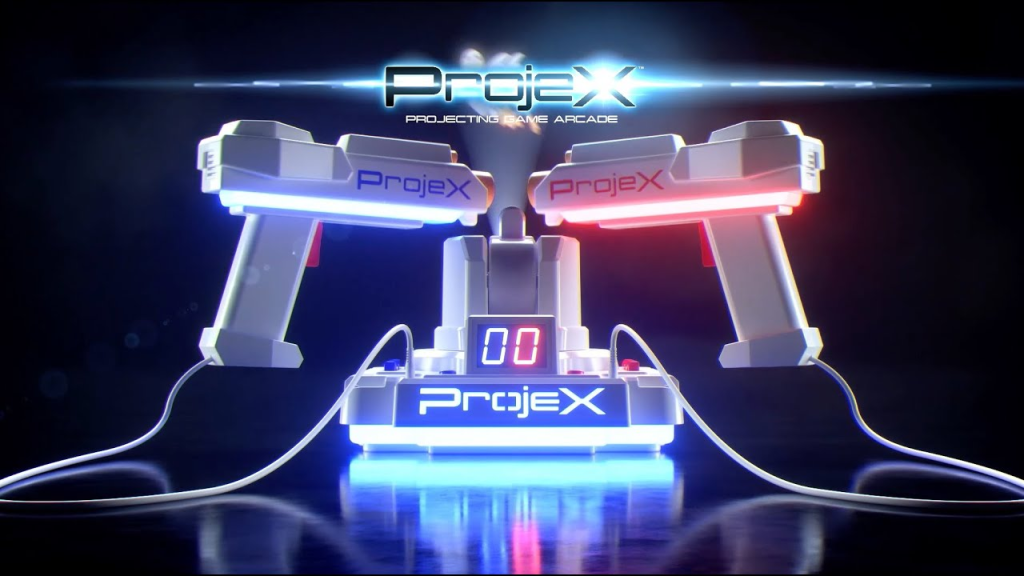
The ProjeX Projecting Game Arcade by NSI International Inc. is a portable, screen-free electronic target-shooting toy that projects moving animated objects directly onto any light-colored wall. Retailing for around $50, it mimics a classic retro gaming experience without requiring a television screen, Wi-Fi, or external sensors. It includes a central projector console, three interchangeable image slides (ducks, UFOs, and bullseyes), and two color-coded blasters with internal LED target pointers. Operating on 4 “AA” batteries, it features 5 built-in modes and 3 difficulty settings, automatically tracking hits via an integrated LED scoreboard.
Quick Highlights
| Manufacturer | NSI International Inc. |
|---|---|
| Core Tech | LED Projection + Optical Blaster Detection |
| Targets Included | Ducks, UFOs, Classic Bullseyes |
| Player Modes | Solo, Head-to-Head, Co-Op |
| Power Source | 4 “AA” Batteries (Rechargeable strongly advised) |
What makes this projector-based toy popular right now?
As screen time among American children ages 8 to 12 averages roughly 4 to 6 hours daily according to the American Academy of Pediatrics, parents are actively seeking engaging alternatives. The modern living room has become a tech-overload zone, driving a major shift toward offline entertainment. This battery-powered device captures the nostalgic feel of 1990s light-gun classics like Duck Hunt or Area 51, yet it bypasses the television entirely.
By turning any blank wall into an interactive zone, it satisfies a child’s desire for digital action while giving their eyes a break from high-definition blue light. It functions anywhere from a dark basement to a suburban garage door at night, making it a highly adaptable option for family entertainment.
How has target-shooting entertainment changed over time?
The evolution of home shooting toys shows a massive shift in how safety, convenience, and technology intersect. Looking back at how we used to play versus how we play today reveals exactly why projection setups have taken over.
What it used to be
Home target shooting meant physical projectiles. Nerf darts lost their suction within a week and ended up behind couches. Early electronic setups used heavy static targets that buzzed when a primitive infrared beam registered a hit, while moving targets needed bulky mechanical galleries with plastic ducks on a motorized belt that jammed constantly.
What it became later
In the late 1980s and 1990s, light-gun systems arrived on home consoles. Revolutionary but tethered to heavy Cathode-Ray Tube (CRT) televisions, they relied on the precise timing of an electron beam scanning the glass. When flat-screen LCDs and plasmas took over, those classic light-guns instantly stopped working.
What it is now
Devices like the ProjeX system eliminate the television entirely — the room itself becomes the environment. Using energy-efficient LED projection, animated images move smoothly across drywall, plaster, or concrete. No darts to lose, no plastic pieces to step on, and no risk of cracking a $1,000 smart TV.
What features are built into the central hardware?
At the heart of the system is the central console, which serves as both the projector and the computer that runs the software. Unlike high-end home theater projectors that generate significant heat and require loud cooling fans, this device uses a low-temperature LED light source specifically optimized for high-contrast shapes.
Central Console Base — Projector lens & LED screen
Left Slot Blaster 1 storage · Center Projector · Right Slot Blaster 2 storage
The console anchors both blasters on either side and houses the projector lens and LED screen in the middle, keeping the whole kit self-contained between sessions.
The Slide Insertion System
The console features a slot on top where you insert one of three included slide discs. Each disc contains micro-optics that dictate what shapes appear on your wall:
Blue Slide — Classic Bullseyes
Excellent for beginners practicing their reaction times.
Yellow Slide — Flying Ducks
A direct nod to retro hunting software, featuring flapping wings and erratic horizontal flight paths.
Green Slide — UFOs
The fastest-moving option, designed to simulate an alien invasion with spinning patterns.
Each slide triggers distinct, built-in sound effects from the console’s internal speaker. When a duck is hit, the console emits a classic quack; when a UFO is struck, a retro sci-fi explosion sound plays.
The Control Interface and Skill Settings
On the rear face of the console sits a crisp LED scoreboard and tactile selection buttons. Users can toggle between three specific skill tiers:
| Skill Tier | Behaviour |
|---|---|
| Beginner | Targets remain on the wall longer, moving at a slower pace with a wider hit-detection radius. |
| Advanced | Speed increases by roughly 40%, requiring faster panning. |
| Expert | Targets appear briefly, zip across the projection zone, and disappear within seconds, demanding excellent hand-eye coordination. |
The console also houses the scoring chips. It tracks every successful hit instantly, displaying the current tally on the LED screen so players do not have to argue over who won a match.
How do the dual blasters actually register hits?
The two included blasters (one molded in bright red, the other in deep blue) connect directly to the sides of the main console via flexible, heavy-gauge cords. They do not use real lasers, making them completely safe for children and pets. Instead, they rely on a clever combination of focused LED light beams and optical sensors.
| Component | Function |
|---|---|
| Trigger Pull | Emits a timed light pulse toward the wall. |
| LED Pointer | Projects a constant, dim aiming reticle. |
| Pump-Action | Resets the internal 6-shot capacity counter. |
When you pull the trigger, the blaster emits a precise, instantaneous pulse of light aimed at the wall. The central console’s optical sensor monitors the projection area. If the coordinates of your blaster’s light pulse match the exact location of the projected target at that millisecond, the microchip registers a hit.
To keep the action immersive, each weapon features a strict 6-shot capacity. An electronic clicking sound indicates when a blaster is empty. To reload, the player must physically pull back on the pump-action slide on the front of the barrel, mimicking a real shotgun or arcade controller. This mechanic adds strategy, as players must time their reloads between target spawns to avoid missing a high-value object.
Which multiplayer modes can you play?
The dual-blaster setup allows for multiple configurations, making it highly versatile for solo play, playdates, or family gatherings. The software includes three primary configurations:
Solo Play
Designed for a single player using one blaster. The user tests their reflexes against the clock, attempting to break their personal high score across the five built-in variations — an excellent tool for building spatial awareness and hand-eye coordination.
Head-to-Head
Player 1 (Red) and Player 2 (Blue) face the wall simultaneously and race to hit targets first. The processor differentiates the two blasters down to milliseconds: if Red hits a fraction of a second before Blue, the point goes to Red and the target instantly explodes.
Co-Op Mode
Perfect for younger siblings or parent-child pairings who prefer teamwork. Both players clear the wall together, combining hits into a single team score. Great for teaching communication by dividing the wall into “left zone” and “right zone” responsibilities.
How do you set up the room for the best accuracy?
Because this toy relies entirely on projected light and optical sensors, its performance depends heavily on the room setup. Following a few precise environmental guidelines ensures flawless hit detection and sharp image quality.
Ideal room layout: a blank, light-colored wall · projector console on a low, stable table 5 feet (1.5 m) from the wall · a 100% darkened room (blinds closed, lights off) for best contrast.
1. Light Control
The single most important factor is darkness — the room should be as close to pitch black as possible. Blackout curtains or blinds are essential during daytime. Ambient light from open doors, digital clocks, or streetlights dilutes contrast, making targets harder to see and harder for the sensor to track.
2. Wall Choice
The ideal canvas is a smooth, matte, light-colored wall — white, cream, or light gray drywall works perfectly. Avoid busy wallpaper, dark paint, or heavy texturing (deep popcorn or knockdown), as these surfaces break up the light beams and distort tracking.
3. Distance & Placement
Place the console on a low coffee table or stool exactly 5 feet (1.5 m) from the wall. This distance is factory-calibrated to deliver the sharpest focus and the ideal image size, roughly 3 to 4 feet wide.
Important: Ensure the table is perfectly stable. If a player kicks the table or yanks a blaster cord during rapid play, shifting the base even an inch will misalign the optical tracking, causing future shots to miss until the unit is reset.
What are the pros and cons according to real parents?
Consumer feedback across major retail channels shows a clear picture of where this toy excels and where it falls short. Analyzing these real-world metrics helps buyers set accurate expectations before purchasing.
Advantages
- Instant setup: parents praise the plug-and-play nature — no updates, no Bluetooth syncing, no calibration app. Insert batteries, plug in the blasters, slide in a disc, turn it on.
- Active physical play: unlike couch-bound video games, it makes players stand, turn, duck, and pan their bodies — great for burning energy indoors during winter or rainy days.
- Genuine portability: under three pounds and no AC outlet or TV needed, so it travels to camping trips (projected on an RV) or onto a garage door for block parties.
Disadvantages
- Heavy battery consumption: the projection bulb, dual sensors, and speaker drain standard alkaline batteries within roughly 2 to 3 hours of continuous multiplayer play.
- Sensitivity to base movement: if players pull too hard on the cords, the base shifts and throws off calibration. It takes a bit of discipline from younger kids to avoid yanking the blasters during intense moments.
How can you maximize battery life?
Given the high energy demands of the system, relying on cheap, single-use batteries will quickly become expensive. Implementing a smart power strategy ensures continuous play without frequent trips to the store.
| Battery Type | Average Lifespan | Reusability |
|---|---|---|
| Standard Alkaline | 2 – 3 Hours | None (Disposable) |
| Heavy-Duty Lithium | 5 – 6 Hours | None (Disposable) |
| NiMH Rechargeable | 4 – 5 Hours | High (Up to 500+ charges) |
To optimize your setup, invest in a dedicated set of four high-capacity Nickel-Metal Hydride (NiMH) rechargeable batteries (such as Panasonic Eneloop or AmazonBasics High-Capacity) rated at 2000mAh or higher. While the upfront cost of a charger and rechargeable cells is higher than a standard pack of alkalines, the investment pays for itself within the first month of ownership.
Furthermore, NiMH batteries maintain a consistent voltage curve throughout their charge cycle. Standard alkaline batteries suffer from a gradual drop in voltage as they drain, causing the projected image to dim and hit detection to degrade well before the battery is fully dead. Rechargeable cells deliver peak power right up until they are empty, ensuring optimal accuracy throughout your entire session.
What alternative buying options are available?
If you are exploring the marketplace for this style of entertainment, NSI International offers a few distinct variations to match different budgets and play preferences.
Standard Flagship Base Unit
The widely available model reviewed throughout this guide. It includes the primary console, two plug-in blasters, and the three core target slides (Ducks, UFOs, and Bullseyes). It offers the most balanced experience for households with multiple children.
Laser X Duck Arcade
Also produced by NSI International, this specialized variation is streamlined for retro hunting fans. It focuses exclusively on animated duck-hunting scenarios using a single-blaster format, and is often priced lower than the dual-blaster flagship — an excellent budget-friendly choice for solo players or smaller spaces.
Where to Buy
If you are looking to purchase a unit or hunt for replacement parts, several reliable retail channels are available:
- Brand-new units: check current stock on the Target product page or browse the Walmart online store for seasonal discounts and bundle deals.
- Regional sports variants: for specialized or sports-themed editions, explore the Academy Sports + Outdoors catalog.
- Secondary market: for discounted older models, replacement blasters, or extra slide discs, check listings on the eBay ProjeX marketplace.
Summary Checklist for Buyers
Before unboxing your system, run through this quick checklist to ensure a smooth first session:
- Acquire 4 fresh, high-capacity AA rechargeable batteries.
- Identify a completely blank, light-colored wall area.
- Ensure the room can be fully darkened (pull shades, turn off hall lights).
- Prepare a stable coffee table exactly 5 feet away from the wall surface.
- Instruct players on the pump-action reload mechanic before starting.
By managing the lighting conditions and choosing the right power source, this projecting setup delivers an excellent, active, screen-free alternative that brings classic arcade energy straight to your home.